Exploring the ARC Client Portal: A Strategic Value-Add for Enterprise Device Management
In today’s fast-moving enterprise environment, device management isn’t just about keeping devices charged — it’s about visibility, efficiency, and accountability. The ARC Client Portal provides a centralized hub for reporting, dashboards, and fleet oversight, helping organizations manage shared device fleets more effectively.
What is the Client Portal?
ARC’s Client Portal consolidates operational controls and performance data in a single web-based dashboard. Administrators, operations teams, and store managers can:
Set alerts for timely action (unreturned or damaged devices)
It provides a clear view of fleet operations and acts as a command center to optimize device usage.
Reporting & Analytics Key capabilities include:
1. Device Status & Utilization
Real-time breakdown of devices in use vs. idle
Overdue, missing, or returns
Trends such as peak pick up and return times
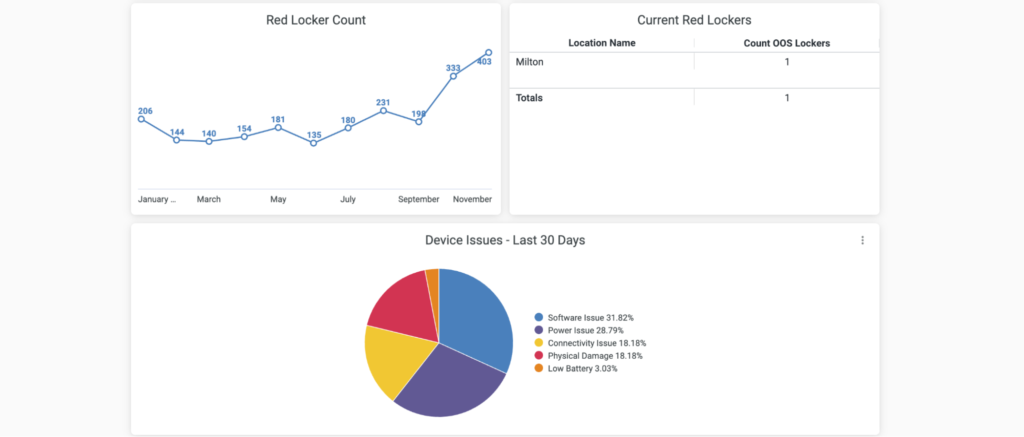
2. Device Issue Trends
Track recurring device problems and employee-reported issues
Identify devices or team members that may require attention or retraining
3. Fleet Inventory & Shrinkage Metrics
Monitor loss and shrinkage indicators
Evaluate overstock and unused devices, allowing for device load-balancing across locations
4. Dashboard Views & Alerts
Fleet-wide and location-level dashboards
Alerts for critical issues
Drill-down from fleet → location → device
5. Integration & Data Export
Export or share data across business systems
Integrate user rosters with existing HR systems
Why It’s a Value-Add
ARC modernizes device management from end to end — securing, charging, and tracking devices to ensure they’re ready for every shift. Our Client Portal delivers operational and strategic benefits:
Real-Time Visibility
Quickly identify issues like uncharged or unreturned devices. Employees can report damage immediately, keeping the fleet healthy and minimizing surprises.
Operational Efficiency
Reduce time spent tracking missing devices, auditing inventory, or managing downtime. ARC clients report up to 84% reduction in device-management time.
Reduced Waste & Leaner Inventory
Optimize fleet size to avoid idle devices and unnecessary replacements, improving ROI.
Data-Driven Decisions & Accountability
Track checkout patterns, balance fleets across sites, and ensure tasks are completed on time. Alerts and reports make accountability straightforward.
Integration with Technical Systems
Connect charging technology, self-service checkout, multiple networks, and error-handling logic so data isn’t siloed.
Better Shift Readiness
Devices are consistently available, charged, and tracked, resulting in smoother operations and higher frontline productivity.
Best Practices & Tips for Maximizing the Portal
Define Key Metrics: Focus on KPIs like overdue devices, locker tasks, and performance scorecard.
Set Roles & Access Levels: Managers get location-specific dashboards; enterprise views are for senior ops/IT.
Configure Alerts Wisely: Prioritize high-impact triggers to prevent alert fatigue.
Link Alerts to Action: Feed alerts into repair, ticketing, or workflow systems.
Review Trends: Spot recurring patterns and optimize operations.
Adjust Inventory Based on Insights: Reassign underused devices or reduce overstock.
Train Managers: Ensure frontline leaders understand dashboards and can respond effectively.
Quarterly Reviews: Use data to guide fleet strategy and lifecycle planning.
Final Takeaway
The ARC Client Portal transforms device management from reactive troubleshooting to proactive optimization. By leveraging its insights, organizations can reduce shrink, cut overstock, boost productivity, and ensure devices are ready, healthy, and in the right hands. More than just a reporting tool, it’s a strategic asset for unlocking operational and financial value.